Filtering Pfsense firewall logs with Graylog
I have, once again, tested a new kind of logging-related solution and built a Graylog setup using Ansible and Docker. This post covers a sub-set of the whole setup concentrating on Pfsense logs.
Overview
The architecture I have is somewhat like this:
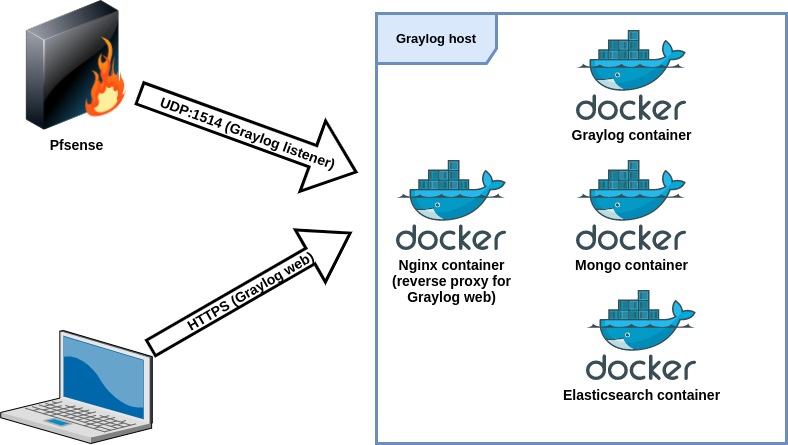
I’m not going to go through the whole docker environment setup, but I use Ansible playbooks for this and might publish those when I have time to do some cleaning with the playbooks. Here’s a snippet of how I deploy the Docker container using Ansible:
- name: Deploy graylog container
  community.docker.docker_container:
    name: graylog
    image: "graylog/graylog:{{ graylog_container_version }}"
    restart_policy: on-failure
    networks:
      - name: "{{ docker_net['name'] }}"
        ipv4_address: "{{ docker_graylog_ip }}"
    links:
      - "mongo:mongo"
      - "elasticsearch:elasticsearch"
    ports:
      - "9000:9000"
      - "12201:12201"
      - "1514/udp:1514/udp"
      - "5540:5540"
      - "5544:5544"
    env:
      GRAYLOG_HTTP_EXTERNAL_URI="{{ graylog_uri }}"
      GRAYLOG_ROOT_PASSWORD_SHA2="{{ graylog_passwod_sha2 }}"
  become: yes
Graylog configuration
UDP input
Create a new UDP input in System -> Inputs.
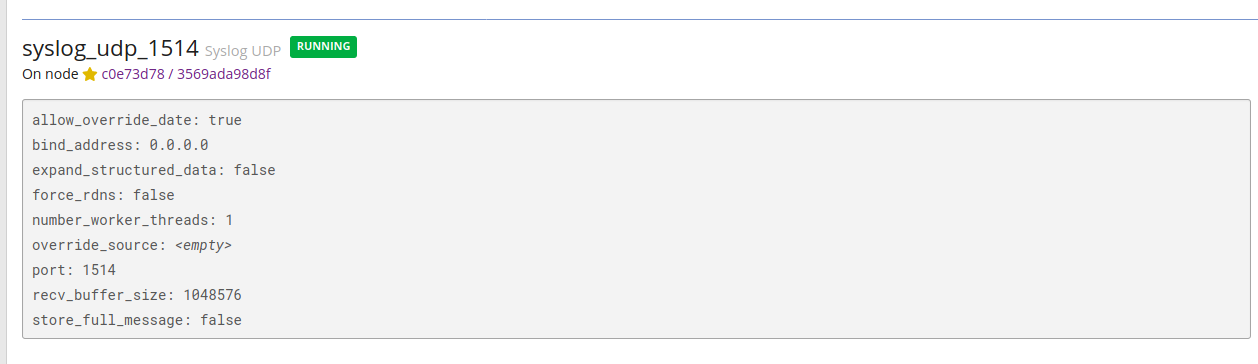
I have bound the container’s port 1514 to the host machine’s port 1514 and then allowed that port in the host machine’s local firewall.
You can see that binding done in the Ansible snippet above (ports section).
Grok patterns for input extractor
I was too lazy to start writing Grok patterns myself and started searching if there would be existing ones that I could use and I found this: https://raw.githubusercontent.com/patrickjennings/logstash-pfsense/master/patterns/pfsense2-4.grok.
To import these patterns just save those in a file and in Graylog go to System -> Grok Patterns and select import pattern file.
# source: https://raw.githubusercontent.com/patrickjennings/logstash-pfsense/master/patterns/pfsense2-4.grok
PFSENSE_LOG_DATA (%{INT:rule}),(%{INT:sub_rule})?,,(%{INT:tracker}),(%{DATA:iface}),(%{WORD:reason}),(%{WORD:action}),(%{WORD:direction}),(%{INT:ip_ver}),
PFSENSE_IP_SPECIFIC_DATA (%{PFSENSE_IPv4_SPECIFIC_DATA}|%{PFSENSE_IPv6_SPECIFIC_DATA})
PFSENSE_IPv4_SPECIFIC_DATA (%{BASE16NUM:tos}),,(%{INT:ttl}),(%{INT:id}),(%{INT:offset}),(%{WORD:flags}),(%{INT:proto_id}),(%{WORD:proto}),
PFSENSE_IPv4_SPECIFIC_DATA_ECN (%{BASE16NUM:tos}),(%{INT:ecn}),(%{INT:ttl}),(%{INT:id}),(%{INT:offset}),(%{WORD:flags}),(%{INT:proto_id}),(%{WORD:proto}),
PFSENSE_IPv6_SPECIFIC_DATA (%{BASE16NUM:class}),(%{DATA:flow_label}),(%{INT:hop_limit}),(%{WORD:proto}),(%{INT:proto_id}),
PFSENSE_IP_DATA (%{INT:length}),(%{IP:src_ip}),(%{IP:dest_ip}),
PFSENSE_PROTOCOL_DATA (%{PFSENSE_TCP_DATA}|%{PFSENSE_UDP_DATA}|%{PFSENSE_ICMP_DATA}|%{PFSENSE_CARP_DATA})
PFSENSE_TCP_DATA (%{INT:src_port}),(%{INT:dest_port}),(%{INT:data_length}),(%{WORD:tcp_flags}),(%{INT:sequence_number}),(%{INT:ack_number}),(%{INT:tcp_window}),(%{DATA:urg_data}),(%{DATA:tcp_options})
PFSENSE_UDP_DATA (%{INT:src_port}),(%{INT:dest_port}),(%{INT:data_length})
PFSENSE_ICMP_DATA (%{PFSENSE_ICMP_TYPE}%{PFSENSE_ICMP_RESPONSE})
PFSENSE_ICMP_TYPE (?<icmp_type>(request|reply|unreachproto|unreachport|unreach|timeexceed|paramprob|redirect|maskreply|needfrag|tstamp|tstampreply)),
PFSENSE_ICMP_RESPONSE (%{PFSENSE_ICMP_ECHO_REQ_REPLY}|%{PFSENSE_ICMP_UNREACHPORT}| %{PFSENSE_ICMP_UNREACHPROTO}|%{PFSENSE_ICMP_UNREACHABLE}|%{PFSENSE_ICMP_NEED_FLAG}|%{PFSENSE_ICMP_TSTAMP}|%{PFSENSE_ICMP_TSTAMP_REPLY})
PFSENSE_ICMP_ECHO_REQ_REPLY (%{INT:icmp_echo_id}),(%{INT:icmp_echo_sequence})
PFSENSE_ICMP_UNREACHPORT (%{IP:icmp_unreachport_dest_ip}),(%{WORD:icmp_unreachport_protocol}),(%{INT:icmp_unreachport_port})
PFSENSE_ICMP_UNREACHPROTO (%{IP:icmp_unreach_dest_ip}),(%{WORD:icmp_unreachproto_protocol})
PFSENSE_ICMP_UNREACHABLE (%{GREEDYDATA:icmp_unreachable})
PFSENSE_ICMP_NEED_FLAG (%{IP:icmp_need_flag_ip}),(%{INT:icmp_need_flag_mtu})
PFSENSE_ICMP_TSTAMP (%{INT:icmp_tstamp_id}),(%{INT:icmp_tstamp_sequence})
PFSENSE_ICMP_TSTAMP_REPLY (%{INT:icmp_tstamp_reply_id}),(%{INT:icmp_tstamp_reply_sequence}),(%{INT:icmp_tstamp_reply_otime}),(%{INT:icmp_tstamp_reply_rtime}),(%{INT:icmp_tstamp_reply_ttime})
PFSENSE_CARP_DATA (%{WORD:carp_type}),(%{INT:carp_ttl}),(%{INT:carp_vhid}),(%{INT:carp_version}),(%{INT:carp_advbase}),(%{INT:carp_advskew})
DHCPD (%{DHCPDISCOVER}|%{DHCPOFFER}|%{DHCPREQUEST}|%{DHCPACK}|%{DHCPINFORM}|%{DHCPRELEASE})
DHCPDISCOVER %{WORD:dhcp_action} from %{COMMONMAC:dhcp_client_mac}%{SPACE}(\(%{GREEDYDATA:dhcp_client_hostname}\))? via (?<dhcp_client_vlan>[0-9a-z_]*)(: %{GREEDYDATA:dhcp_load_balance})?
DHCPOFFER %{WORD:dhcp_action} on %{IPV4:dhcp_client_ip} to %{COMMONMAC:dhcp_client_mac}%{SPACE}(\(%{GREEDYDATA:dhcp_client_hostname}\))? via (?<dhcp_client_vlan>[0-9a-z_]*)
DHCPREQUEST %{WORD:dhcp_action} for %{IPV4:dhcp_client_ip}%{SPACE}(\(%{IPV4:dhcp_ip_unknown}\))? from %{COMMONMAC:dhcp_client_mac}%{SPACE}(\(%{GREEDYDATA:dhcp_client_hostname}\))? via (?<dhcp_client_vlan>[0-9a-z_]*)(: %{GREEDYDATA:dhcp_request_message})?
DHCPACK %{WORD:dhcp_action} on %{IPV4:dhcp_client_ip} to %{COMMONMAC:dhcp_client_mac}%{SPACE}(\(%{GREEDYDATA:dhcp_client_hostname}\))? via (?<dhcp_client_vlan>[0-9a-z_]*)
DHCPINFORM %{WORD:dhcp_action} from %{IPV4:dhcp_client_ip} via %(?<dhcp_client_vlan>[0-9a-z_]*)
DHCPRELEASE %{WORD:dhcp_action} of %{IPV4:dhcp_client_ip} from %{COMMONMAC:dhcp_client_mac}%{SPACE}(\(%{GREEDYDATA:dhcp_client_hostname}\))? via
With a line like this:
4,,,1000000103,igb0,match,block,in,4,0x0,,243,5411,0,none,6,tcp,40,192.168.5.1,192.168.5.2,61953,8001,0,S,2164284354,,1024,,
The output with %{PFSENSE_LOG_DATA}%{PFSENSE_IP_SPECIFIC_DATA}%{PFSENSE_IP_DATA} pattern would look like this:
PFSENSE_LOG_DATA
    4,,,1000000103,igb0,match,block,in,4,
rule
    4
tracker
    1000000103
iface
    igb0
reason
    match
action
    block
direction
    in
ip_ver
    4
PFSENSE_IP_SPECIFIC_DATA
    0x0,,249,2778,0,none,6,tcp,
PFSENSE_IPv4_SPECIFIC_DATA
    0x0,,249,2778,0,none,6,tcp,
tos
    0x0
ttl
    249
id
    2778
offset
    0
flags
    none
proto_id
    6
proto
    tcp
PFSENSE_IP_DATA
    40,192.168.5.1,192.168.5.2,
length
    40
src_ip
    192.168.5.1
IPV4
    [192.168.5.1, 192.168.5.2]
dest_ip
    192.168.5.2
Adding extractor
Go to System -> Inputs and select Manage extractors for the input that receives Pfsense logs. Insert your Grok pattern and save the extractor. For example:
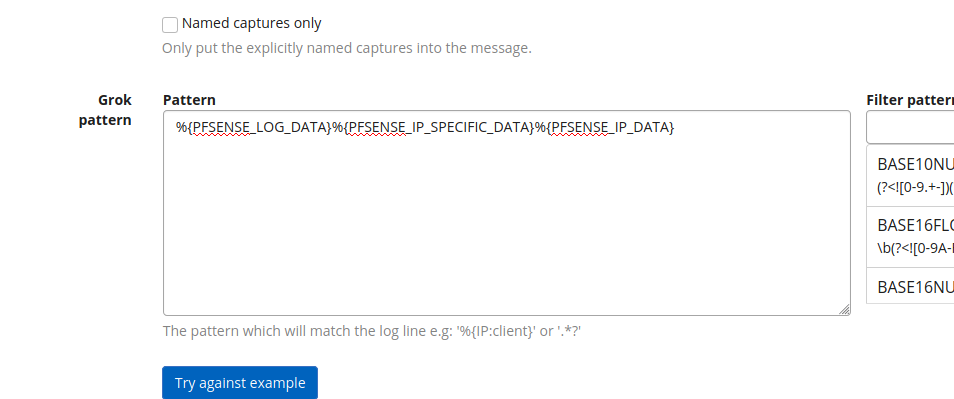
This is how I do this with Ansible:
- Variables that define inputs and extractors:
graylog_inputs:
  - configuration:
      bind_address: 0.0.0.0
      number_worker_threads: 1
      override_source: null
      port: 1514
      recv_buffer_size: 1048576
    global: false
    node: "placeholder"
    title: syslog_udp_1514
    type: org.graylog2.inputs.syslog.udp.SyslogUDPInput

graylog_extractors:
  syslog_udp_1514:
    - converters: {}
      extractor_type: "grok"
      cut_or_copy: "copy"
      title: "pfsense"
      order: 0
      source_field: "message"
      target_field: ""
      extractor_config:
        grok_pattern: "%{PFSENSE_LOG_DATA}%{PFSENSE_IP_SPECIFIC_DATA}%{PFSENSE_IP_DATA}" # import server/roles/docker-graylog/files/pfsense-grok.grok / not automated yet
      condition_type: "none"
      condition_value: ""
- Task file that loops all inputs:
- include_tasks: extractors.yml
  loop: "{{ inputs['json']['inputs'] }}"
  loop_control:
    loop_var: input
- Task file that creates extractors for the input:
---
- set_fact:
    existing_extractors: []

- name: Get extractors
  uri:
    url: "{{ graylog_exteranl_domain }}/api/system/inputs/{{ input['id'] }}/extractors"
    return_content: yes
    validate_certs: no
    user: "{{ graylog_user }}"
    password: "{{ graylog_password_plain }}"
  register: extractors
  delegate_to: localhost

- set_fact:
    existing_extractors: "{{ existing_extractors + [ extractor['title'] ] }}"
  loop: "{{ extractors['json']['extractors'] }}"
  loop_control:
    loop_var: extractor

- debug:
    var: extractors['json']['extractors']

- name: Create exctractor if one with the title doesn't exist
  uri:
    url: "{{ graylog_exteranl_domain }}/api/system/inputs/{{ input['id'] }}/extractors"
    return_content: yes
    method: POST
    validate_certs: no
    body_format: json
    body: '{{ extractor|from_yaml|to_json }}'
    user: "{{ graylog_user }}"
    password: "{{ graylog_password_plain }}"
    headers:
      X-Requested-By: 'localhost'
    status_code: 201
  delegate_to: localhost
  loop: "{{ graylog_extractors[input['title']] }}"
  loop_control:
    loop_var: extractor
  when: "input['title'] in graylog_extractors and extractor['title'] not in existing_extractors"
Pfsense configuration
To configure remote logging in Pfsense, go to Status –> System Logs –> Settings.
Settings seen in the below picture are pretty self-explanatory. Just select events you want to send and specify remote host(s). Remember to specify port if not using default 514 and note that Pfsense GUI configuration only supports UDP sending.
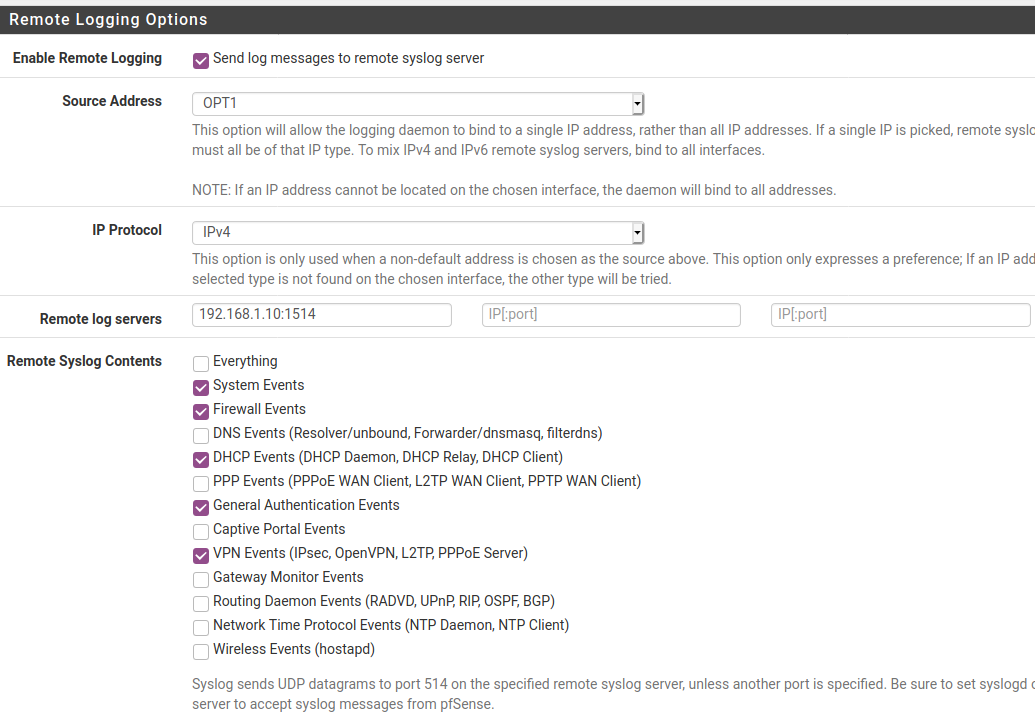
I first had an issue that logs coming from Pfsense did not include the source. Meaning that there was no IP or hostname to tell the origin of the event. After some searching this was solved by modifying the log format option to RFC 5424 in “Log Message Format” setting.
