Linux hardening with OpenSCAP
This post shows an example of how to verify and harden Rocky Linux 9 against CIS Benchmark using OpenSCAP tools.
Install
dnf install scap-security-guide openscap
Eval
The evaluation with OpenSCAP means checking the current state of system against pre-defined security profile. There can be multiple different profiles available depending on the distribution.
Choosing profile
Profile files should be found under /usr/share/xml/scap/ssg/content/.
$ ls -la /usr/share/xml/scap/ssg/content/
total 44912
drwxr-xr-x. 2 root root       52 Sep  9 15:41 .
drwxr-xr-x. 3 root root       21 Sep  9 15:41 ..
-rw-r--r--. 1 root root 23101062 Feb 28  2023 ssg-rhel9-ds.xml
-rw-r--r--. 1 root root 22885038 Feb 28  2023 ssg-rl9-ds.xml
The command oscap info is used to see profiles inside a XML definition file.
$ oscap info /usr/share/xml/scap/ssg/content/ssg-rl9-ds.xml
Document type: Source Data Stream
Imported: 2023-02-28T18:34:33

Stream: scap_org.open-scap_datastream_from_xccdf_ssg-rhel9-xccdf.xml
Generated: (null)
Version: 1.3
Checklists:
	Ref-Id: scap_org.open-scap_cref_ssg-rhel9-xccdf.xml
		Status: draft
		Generated: 2023-02-28
		Resolved: true
		Profiles:
			Title: ANSSI-BP-028 (enhanced)
				Id: xccdf_org.ssgproject.content_profile_anssi_bp28_enhanced
			Title: ANSSI-BP-028 (high)
				Id: xccdf_org.ssgproject.content_profile_anssi_bp28_high
			Title: ANSSI-BP-028 (intermediary)
				Id: xccdf_org.ssgproject.content_profile_anssi_bp28_intermediary
			Title: ANSSI-BP-028 (minimal)
				Id: xccdf_org.ssgproject.content_profile_anssi_bp28_minimal
			Title: CIS Red Hat Enterprise Linux 9 Benchmark for Level 2 - Server
				Id: xccdf_org.ssgproject.content_profile_cis
			Title: CIS Red Hat Enterprise Linux 9 Benchmark for Level 1 - Server
				Id: xccdf_org.ssgproject.content_profile_cis_server_l1
			Title: CIS Red Hat Enterprise Linux 9 Benchmark for Level 1 - Workstation
				Id: xccdf_org.ssgproject.content_profile_cis_workstation_l1
			Title: CIS Red Hat Enterprise Linux 9 Benchmark for Level 2 - Workstation
				Id: xccdf_org.ssgproject.content_profile_cis_workstation_l2
			Title: [DRAFT] Unclassified Information in Non-federal Information Systems and Organizations (NIST 800-171)
				Id: xccdf_org.ssgproject.content_profile_cui
			Title: Australian Cyber Security Centre (ACSC) Essential Eight
				Id: xccdf_org.ssgproject.content_profile_e8
			Title: Health Insurance Portability and Accountability Act (HIPAA)
				Id: xccdf_org.ssgproject.content_profile_hipaa
			Title: Australian Cyber Security Centre (ACSC) ISM Official
				Id: xccdf_org.ssgproject.content_profile_ism_o
			Title: Protection Profile for General Purpose Operating Systems
				Id: xccdf_org.ssgproject.content_profile_ospp
			Title: PCI-DSS v3.2.1 Control Baseline for Red Hat Enterprise Linux 9
				Id: xccdf_org.ssgproject.content_profile_pci-dss
			Title: [DRAFT] DISA STIG for Red Hat Enterprise Linux 9
				Id: xccdf_org.ssgproject.content_profile_stig
			Title: [DRAFT] DISA STIG with GUI for Red Hat Enterprise Linux 9
				Id: xccdf_org.ssgproject.content_profile_stig_gui
		Referenced check files:
			ssg-rhel9-oval.xml
				system: http://oval.mitre.org/XMLSchema/oval-definitions-5
			ssg-rhel9-ocil.xml
				system: http://scap.nist.gov/schema/ocil/2
			security-data-oval-com.redhat.rhsa-RHEL9.xml.bz2
				system: http://oval.mitre.org/XMLSchema/oval-definitions-5
Checks:
	Ref-Id: scap_org.open-scap_cref_ssg-rhel9-oval.xml
	Ref-Id: scap_org.open-scap_cref_ssg-rhel9-ocil.xml
	Ref-Id: scap_org.open-scap_cref_ssg-rhel9-cpe-oval.xml
	Ref-Id: scap_org.open-scap_cref_security-data-oval-com.redhat.rhsa-RHEL9.xml.bz2
Dictionaries:
	Ref-Id: scap_org.open-scap_cref_ssg-rhel9-cpe-dictionary.xml
I will be using the profile xccdf_org.ssgproject.content_profile_cis in rest of my examples.
Running evaluation
The oscap eval command is used to evaluate a host’s hardening status against the selected profile.
oscap xccdf eval --report cis.html --results scan-xccdf-results.xml --profile xccdf_org.ssgproject.content_profile_cis /usr/share/xml/scap/ssg/content/ssg-rl9-ds.xml
--report-> output file for HTML report--results-> evaluation details--profile-> selected profile inside the given xccdf file (ssg-rl9-ds.xml)
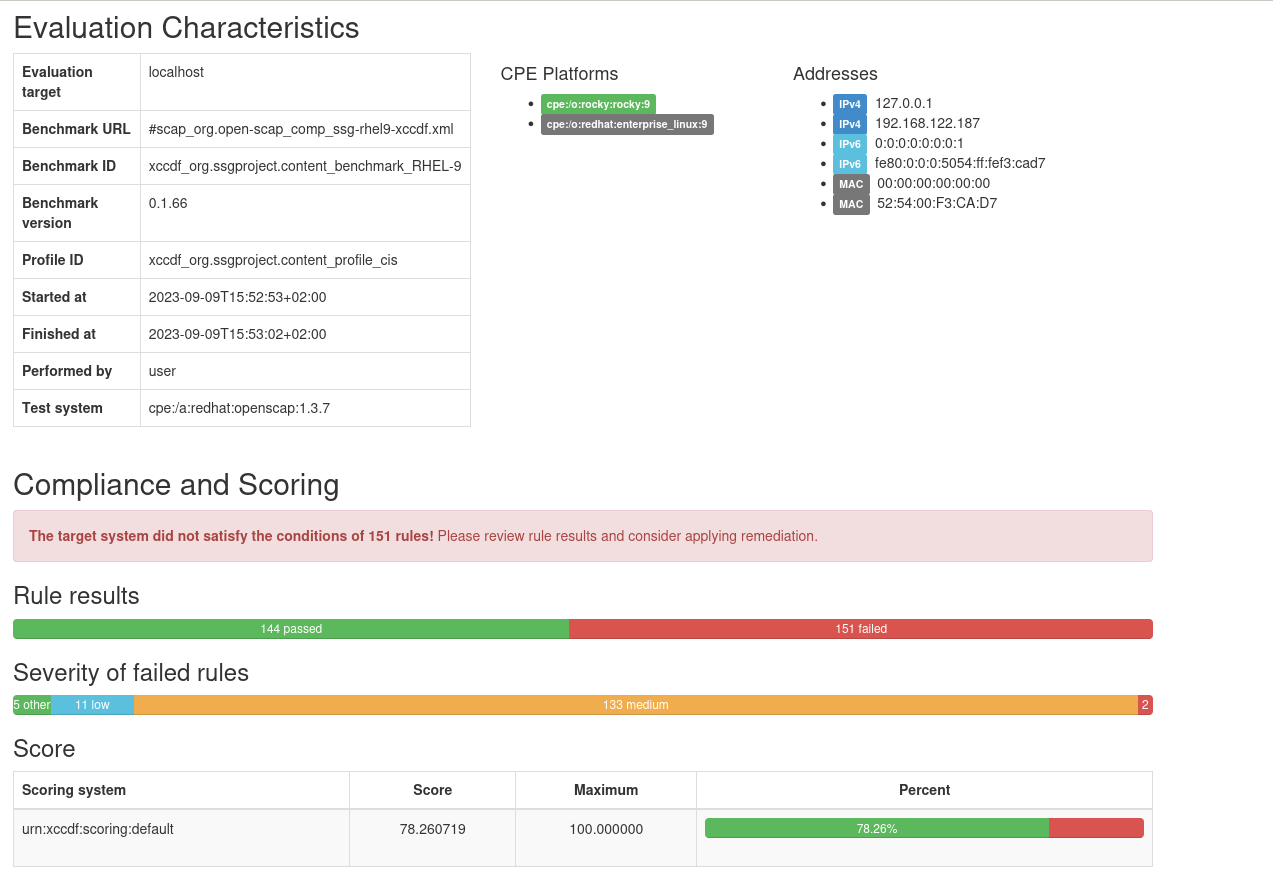
Below is a screenshot from a report against fresh installed Rocky Linux virtual machine.
Harden
I will show a fex examples of how to implement fixes after or even during the evaluation. You can learn more about this from OpenSCAP’s user manual.
With ansible
The scap-security-guide package contains ansible playbooks to implement hardening checks based on the included profiles.
I’m not even sure if these are meant to be run directly or only be used via OpenSCAP tools, but I decided to try using these directly.
Playbooks are located in path /usr/share/scap-security-guide/ansible/. I’ll be using the rl9-playbook-cis.yml playbook because I’m evaluating against the CIS profile.
Ensure that you have ansible installed.
dnf install epel-release
dnf install ansible
Next command will apply hardening steps by running the ansible playbook.
ansible-playbook -i "localhost," -c local /usr/share/scap-security-guide/ansible/rl9-playbook-cis.yml
After this I can re-run the evaluation and check how well it worked.
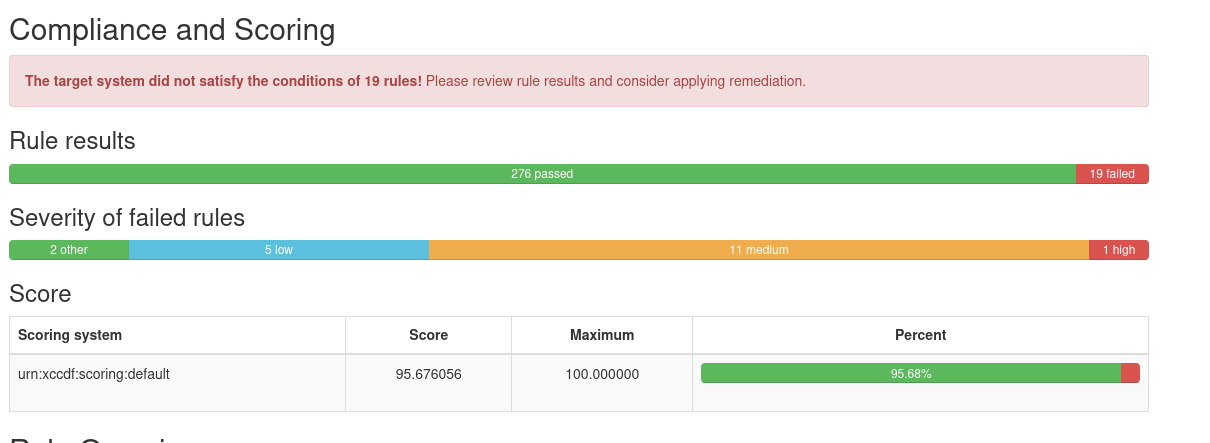
It’s not suprising that score is not 100%. It’s practically impossible to automate all hardening steps while keeping them acceptable for every system. Some of the tasks would always require system specific knowledge. From 151 failed checks to 19 failed is still quite an improvement.
With oscap’s remediation options
It’s possible to directly fix issues during the evaluation by giving the --remediate flag.
oscap xccdf eval --remediate --report cis.html --results scan-xccdf-results.xml --profile xccdf_org.ssgproject.content_profile_cis /usr/share/xml/scap/ssg/content/ssg-rl9-ds.xml
It can also be done with the oscap xccdf remediate command. This requires running the eval first to generate results file.
oscap xccdf remediate --results scan-xccdf-results.xml scan-xccdf-results.xml
With remedation script
The below command will generate a shell script that will hardening steps from the given profile.
oscap xccdf generate fix --template urn:xccdf:fix:script:sh --profile xccdf_org.ssgproject.content_profile_cis --output fix.sh /usr/share/xml/scap/ssg/content/ssg-rl9-ds.xml
Automate
As a simple example, you could automatically run evaluation over SSH using ansible and then fetch report for each host. Below is a simple playbook example to do that. The playbook will also extract the percentual hardening score and print that to stdout.
- hosts: all
  vars:
    oscap_profile: "xccdf_org.ssgproject.content_profile_cis"
    oscap_xccdf_xml: "/usr/share/xml/scap/ssg/content/ssg-rl9-ds.xml"
  tasks:
  - name: Ensure OpenSCAP is installed
    package:
      name:
        - openscap
        - scap-security-guide
        - python3-lxml
    become: yes

  - name: Run evaluation
    command: "oscap xccdf eval --results /tmp/cis-res.xml --report /tmp/cis.html --profile  "
    register: _res
    become: yes
    failed_when: "_res.rc != 0 and _res.rc != 2"

  - name: Get hardening score
    xml:
      path: /tmp/cis-res.xml
      xpath: /x:Benchmark/x:TestResult[@id='xccdf_org.open-scap_testresult_xccdf_org.ssgproject.content_profile_cis']/x:score
      content: text
      namespaces:
        x: http://checklists.nist.gov/xccdf/1.2
    register: res
    become: yes

  - name: "Fetch the report to localhost's /tmp/_cis.html"
    fetch:
      src: /tmp/cis.html
      dest: /tmp/_cis.html
      flat: yes
    become: yes

  - name: Remove remote copy of the HTML report and result file
    file:
      name: /tmp/cis.html
      state: absent
    become: yes
    with_items:
    - /tmp/cis.html
    - /tmp/cis-res.xml

  - name: Hardening score
    debug:
      msg: "{{ (res.matches|first)['{http://checklists.nist.gov/xccdf/1.2}score'] }}"
An example output:
$ ansible-playbook -i hosts.ini oscap.yml

PLAY [all] ********************************************************************************************************************************************************************************************************

TASK [Gathering Facts] ********************************************************************************************************************************************************************************************
ok: [192.168.122.187]

TASK [Ensure OpenSCAP is installed] *******************************************************************************************************************************************************************************
ok: [192.168.122.187]

TASK [Run evaluation] *********************************************************************************************************************************************************************************************
changed: [192.168.122.187]

TASK [Get hardening score] ****************************************************************************************************************************************************************************************
ok: [192.168.122.187]

TASK [Fetch the report to localhost's /tmp/192.168.122.187_cis.html] **********************************************************************************************************************************************
changed: [192.168.122.187]

TASK [Remove remote copy of the HTML report and result file] ******************************************************************************************************************************************************
changed: [192.168.122.187] => (item=/tmp/cis.html)
ok: [192.168.122.187] => (item=/tmp/cis-res.xml)

TASK [Hardening score] ********************************************************************************************************************************************************************************************
ok: [192.168.122.187] => {
    "msg": "95.717720"
}

PLAY RECAP ********************************************************************************************************************************************************************************************************
192.168.122.187            : ok=7    changed=3    unreachable=0    failed=0    skipped=0    rescued=0    ignored=0